
Account
Purpose of This Page
The Account section helps you locate, review, and manage account information within the Client Access Portal (CAP).
Use this page to:
- Search for and select an account
- Navigate to account-related actions
- Understand where to go for inquiry vs. maintenance tasks
Search for an Account
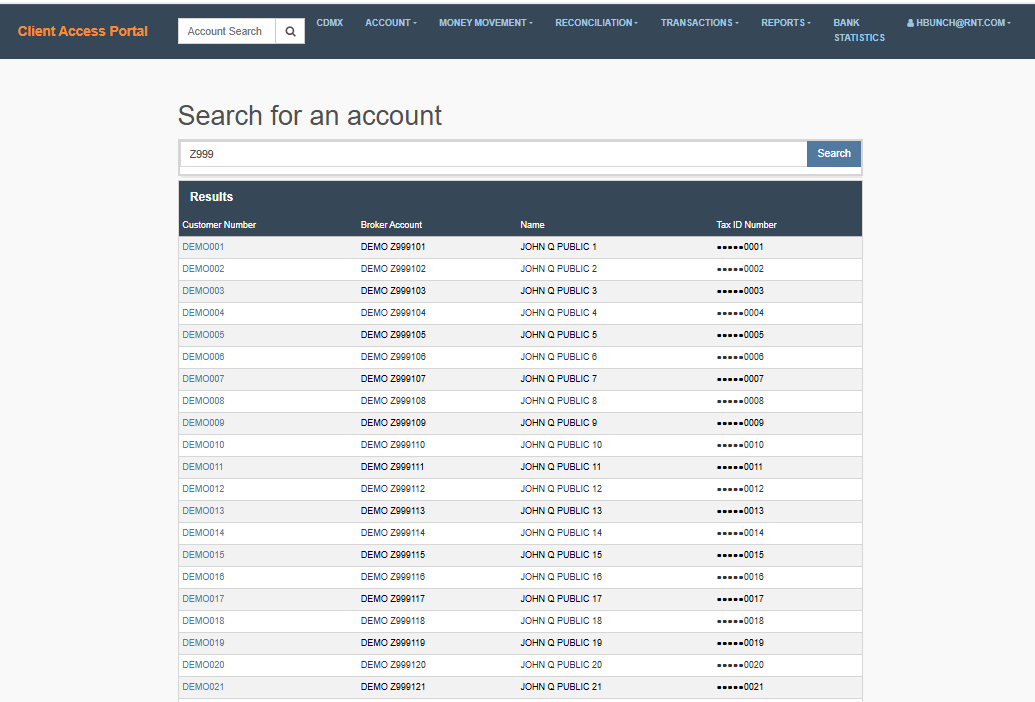
The Account Search feature allows you to quickly locate and select an account to work with.
What You Need to Do
- From the main navigation, enter an account number or search term in the search bar.
- Select the search icon.
- Choose the correct account from the results.

What Happens Next
Once selected:
- The account becomes your active account
- All account-related pages (Inquiry and Maintenance) will use this selection
Helpful Tips
- Use partial values if you do not have the full account number
- Confirm key details (e.g., account number or name) before selecting
Navigate the Account Menu
The Account menu organizes actions into three categories to help you quickly find what you need.
Open an Account
Use this option to create a new account.
Select this when you need to:
- Create a new client account
- Enter account, tax, and customer details
Account Inquiry
Use this section to view and analyze account information.
This section includes:
- Account Overview
- Account Balances
- Transaction History
Use Inquiry when you need to:
- Review account activity
- Check balances or transactions
- Analyze data without making changes
Account Maintenance
Use this section to update or manage account settings.
This section includes:
- Edit Account
- Opt-Outs
- Tier Overrides
Use Maintenance when you need to:
- Make updates to account details
- Modify account settings or preferences
How to Use the Menu
- Open the Account menu from the top navigation.
- Select the appropriate category:
- Open an Account to create a new account
- Inquiry for viewing information
- Maintenance for making updates
- Choose the specific option for your task.
Helpful Tips
- Start with Account Inquiry if you are unsure—this allows you to review information before making changes
- Use Account Maintenance only when updates are required
- Use Open an Account only when creating a new account
Updated about 2 months ago
Did this page help you?